How to choose your Origin: lineage and class
Your character starts from two picks, a lineage and a class, together called your Origin. The lineage decides where your six stats begin. The class adds a smaller spread on top.
In the appSign-up, last stepForge your OriginStatBlockRPG
Every lineage spends exactly twelve stat points and every class exactly four, so no Origin is stronger than another, only shaped differently. If you signed up with StatBlockPro, you pick your Origin later, at the Awakening.
- Pick a lineage
On the Lineage tab, tap a portrait in the strip. The large card above it shows your pick: its flavour, the stat levels it adds and its passive.
- Pick a class
On the Class tab, tap a portrait the same way.
- Check the resultResulting stat block draws your starting levels as a hexagon.
- Create the character
Tap Create character. The button reads "Choose a Lineage and a Class" until both picks are made.
The six lineages
| Lineage | STR | DEX | CON | INT | WIS | CHA | Leans on |
|---|---|---|---|---|---|---|---|
| Emberkin | 5 | 1 | 4 | 0 | 1 | 1 | STR Strength |
| Palewind | 1 | 5 | 2 | 1 | 2 | 1 | DEX Dexterity |
| Stonewake | 3 | 1 | 5 | 1 | 2 | 0 | CON Constitution |
| Luminarch | 0 | 1 | 1 | 5 | 3 | 2 | INT Intelligence |
| Tidebound | 0 | 1 | 3 | 2 | 5 | 1 | WIS Wisdom |
| Giltmoor | 1 | 2 | 0 | 2 | 2 | 5 | CHA Charisma |
The six classes
| Class | STR | DEX | CON | INT | WIS | CHA | Leans on |
|---|---|---|---|---|---|---|---|
| Vanguard | 3 | 0 | 1 | 0 | 0 | 0 | STR Strength |
| Strider | 0 | 3 | 0 | 0 | 1 | 0 | DEX Dexterity |
| Warden | 0 | 0 | 3 | 0 | 1 | 0 | CON Constitution |
| Archivist | 0 | 0 | 0 | 3 | 1 | 0 | INT Intelligence |
| Stillmind | 0 | 0 | 0 | 1 | 3 | 0 | WIS Wisdom |
| Envoy | 0 | 0 | 0 | 1 | 0 | 3 | CHA Charisma |
The picks that also change your numbers
Every card also names a passive. Three of them change your numbers:
- Luminarch (lineage), "+5% XP from everything you log": +5% on the XP multiplier of every activity and workout.
- Archivist (class), "+6% XP from everything you log": +6% in the same way. The two add together, so a Luminarch Archivist (the Lumenscribe) earns +11%.
- Warden (class): a second party summon each day, 2 instead of 1. A party summon calls a friend's stats in to support one dungeon battle (see the Arena guide).
What your archetype title means
Your lineage and class together give your character a title, its archetype: one of 36 names. A Stonewake Archivist is a Runecarver; an Emberkin Vanguard is a Forgebreaker.
It is a name only. It changes no number, and it follows from your Origin, so it is fixed once your Origin is.
| Lineage | Vanguard | Strider | Warden | Archivist | Stillmind | Envoy |
|---|---|---|---|---|---|---|
| Emberkin | Forgebreaker | Cinderrunner | Ashkeeper | Emberscribe | Coalheart | Hearthspeaker |
| Palewind | Squallguard | Windchaser | Stormward | Cloudreader | Hushgale | Whisperborne |
| Stonewake | Bulwarkborn | Screewalker | Cairnwarden | Runecarver | Deepstill | Stonespoken |
| Luminarch | Dawnguard | Glimmerstride | Lanternwarden | Lumenscribe | Clearlight | Beaconvoice |
| Tidebound | Surgebreaker | Tidestrider | Reefwarden | Saltscribe | Deepcalm | Currentspeaker |
| Giltmoor | Gildedguard | Marshstride | Fenwarden | Ledgerkeeper | Quietgilt | Goldtongue |
Where it shows
- On Home, under your name in the header.
- On the character sheet, under your name and in the Origin panel as Archetype, with your Lineage and Class beneath it.
- In the Arena hub's subtitle, which reads like "Jonah Reyes the Lanternwarden".
- On your public profile, for people viewing it in StatBlockRPG.
The six stats and what trains each one
Your character has six stats: STR Strength, DEX Dexterity, CON Constitution, INT Intelligence, WIS Wisdom, CHA Charisma. Each has its own level and its own XP bar, and none of them has a cap.
In the appTrackerBoth dashboards
Everything you log trains them: an activity in the Tracker, a finished workout from the Fitness tab, a day in the food diary. Each activity gives base XP per unit to one or more stats, and in StatBlockRPG the Tracker shows which stats each activity trains. The table shows a few per stat.
| Stat | Activity | Unit | Base XP per unit |
|---|---|---|---|
| STR Strength | Lifting Session | per set | STR 3, CON 1, DEX 0.25 |
| Kettlebell Work | per set | STR 3, CON 2 | |
| Climbing | per minute | STR 0.8, DEX 0.6 | |
| DEX Dexterity | Calisthenics Session | per set | DEX 3, STR 2, CON 0.5 |
| Mobility Work | per minute | DEX 1.2, CON 0.4 | |
| Boxing | per minute | DEX 0.8, CON 0.5 | |
| CON Constitution | Run | per km | CON 8, DEX 4 |
| Steps | per 1,000 steps | CON 5, DEX 2 | |
| Sleep | per hour | CON 7, WIS 4 | |
| Rest Day | per rest day logged | CON 20, WIS 15 | |
| INT Intelligence | Reading (pages) | per page | INT 1, WIS 0.35 |
| Study | per minute | INT 0.9, WIS 0.2, CON 0.1 | |
| Coding | per minute | INT 0.7, DEX 0.15 | |
| WIS Wisdom | Cooked a Meal | per meal | WIS 10, CON 5, CHA 2 |
| Meditation | per minute | WIS 1.5, INT 0.3 | |
| Journalling | per minute | WIS 0.9, INT 0.3 | |
| CHA Charisma | Time With People | per minute | CHA 0.7, WIS 0.25 |
| Craft | per minute | CHA 0.8, DEX 0.25 | |
| Hosting | per event hosted | CHA 12, WIS 4 |
Other ways to earn XP
- The food diary. A finished day of logged food pays up to 90 base CON XP, scaled by how well the day scored against your targets. The nutrition guide explains the score.
- Water. Reaching your water goal pays 25 base CON XP, once per game day. Food and water XP both pass through the daily soft cap below, but the XP multiplier does not apply to them.
- Daily quests pay scrap and items rather than XP. See quests and loot.
How XP turns into levels
A log becomes XP in three steps. The activity's rates give raw XP per stat, the daily soft cap turns that into granted XP, and the multiplier turns granted XP into the whole number added to the stat's bar.
Before you save a log, the log screen's You will earn panel shows exactly what it will award, worked out by the same rules. After you save, the confirmation reads like "40 XP earned", and a filled bar adds "1 level gained". Your XP bars are on Home, under Stats.
The level curve
Moving a stat from level L to the next takes 40 × L1.6 XP, rounded up to the next 10. Each level asks a little more than the last, and the curve never stops.
| Level | XP to the next level | Total XP to reach it |
|---|---|---|
| Level 1 | 40 | 0 |
| Level 2 | 130 | 40 |
| Level 3 | 240 | 170 |
| Level 5 | 530 | 780 |
| Level 10 | 1,600 | 5,390 |
| Level 20 | 4,830 | 34,840 |
| Level 30 | 9,240 | 102,120 |
| Level 50 | 20,920 | 392,010 |
| Level 100 | 63,400 | 2,407,170 |
The daily soft cap
Each stat has a soft cap for the day, and every log fills it a little further. The first XP of the day counts almost in full; later XP counts for less and less, and a stat can never be granted more than its cap in one game day. Nothing is ever cut off, so a genuinely big day still pays more than an ordinary one.
An example: three lifting session logs of 10 sets in one day, for a character with every stat at level 10 and Weightlifting at level 5 (so each stat's cap is S = 145), on a 10-day streak (a multiplier of 1.06).
| Log | Raw STR XP | Granted | Awarded |
|---|---|---|---|
| Session 1 | 30 | 27.1 | 28 |
| Session 2 | 30 | 22.04 | 23 |
| Session 3 | 30 | 17.92 | 18 |
A workout saved late
A log counts on the game day you save it; there is no way to date an activity into the past. A workout from the Fitness tab is the one exception: it counts on the day it started, so a session saved a day or more later earns less.
| Workout saved | XP it earns |
|---|---|
| The day it started, or up to one day later | In full |
| 2 to 3 days later | 50% of the usual XP |
| 4 to 14 days later | 25% of the usual XP |
What multiplies your XP
The XP granted to an activity or a workout is multiplied once, by a number built from three bonuses added together, and then halved if you are Over-Encumbered. The result is rounded down to a whole number.
| Part | What adds to it | Largest it gets |
|---|---|---|
| Base | Every log starts from it | 1 |
| Proficiency | +0.4% per level of the proficiency the activity trains | +60%, at level 150 |
| Origin | Luminarch +5%, Archivist +6% | +11%, as a Lumenscribe |
| Streak | +0.4% per day of your current streak | +20%, from day 50 |
| Over-Encumbered | Multiplies the whole sum | × 0.5 |
For example, a Lumenscribe with a level 20 proficiency on a 30-day streak earns × 1.31: 20 granted XP becomes 26. The streak itself is covered in quests and loot.
Over-Encumbered
Training hard every day without a recovery day eventually halves your XP. That is the game asking you to rest.
How 24-hour buffs work
A log also gives a temporary buff: extra stat points that count toward your stat totals, and so toward every fight in the Arena, for a day.
In the soft-cap example above, the first 10-set log gives +2 STR, +1 CON. A 5 km run at the same levels gives +3 CON, +1 DEX. Food keeps its own CON buff running, up to +6, sized by how well the day's eating scores and recalculated from the whole day each time you log.
You see buffs on Home as a +number beside a stat's level, with each running buff listed underneath and the time it has left, and on the character sheet in the Buff column. The sheet says it plainly: "Buffs last 24 hours: full strength for 20, then they fade. Re-logging the same activity refreshes the timer and takes the larger value; it never stacks."
Grit's moods
On Home in StatBlockRPG, Grit, the small construct in the panel with your streak, shows your state before you read a number. The first mood that applies wins, in this order:
| Grit says | When | What it means |
|---|---|---|
| "Running hot" | You are Over-Encumbered | XP is halved until recovery clears it. Grit's eye half closes and its core dims. |
| "Buffs running", or your streak | At least one buff is running | It counts your active buffs: "Everything you logged today is still working for you." The core brightens and throws sparks. |
| "Recovering" | Your last finished day was a recovery day | "A recovery day counts as progress. Your streak is safe and the strain counter is unwinding." |
| "Nothing logged yet" | None of the above | "Log anything at all (a workout, a walk, a meal cooked, a chapter read) and it becomes permanent XP plus a 24-hour buff." |
Proficiencies and how techniques unlock
Behind the stats sit 16 proficiencies, one per kind of work. Every activity trains exactly one, and every log adds the XP it awarded, across all its stats, to that proficiency.
A proficiency starts at level 1 the first time you log something that trains it and levels on the same curve as a stat. In the soft-cap example, the first 10-set log awarded 40 XP across its stats, so Weightlifting gained 40.
| Proficiency | Stats | Trained by | Unlocks |
|---|---|---|---|
| Weightlifting | STR CON | Lifting Session, Kettlebell Work | Level 10: Servo Break, Strength (Might) Level 30: Piston Drop, Strength (Might) |
| Calisthenics | DEX STR | Calisthenics Session, Martial Arts, Climbing, Boxing, and 3 more | Level 10: Overclock Step, Dexterity (Swift) |
| Running | CON DEX | Run, Steps, Walk, Hike, and 3 more | Level 10: Backup Cell, Constitution (Vital) Level 30: Slipstream, Dexterity (Swift) |
| Cycling | CON STR | Ride | None |
| Swimming | CON WIS | Swim, Rowing, Paddling | Level 30: Blast Plate, Constitution (Vital) |
| Reading | INT WIS | Reading (pages), Reading (time), Audiobook or Podcast | Level 30: Long Scan, Wisdom (Psyche) |
| Studying | INT CON | Study, Language Practice, Puzzles, Lecture or Course, and 2 more | Level 30: Hard Proof, Intelligence (Arcane) |
| Coding | INT DEX | Coding, Tinkering & Repair | Level 10: Zero Day, Intelligence (Arcane) |
| Cooking | WIS CON | Cooked a Meal, Protein Target Met, Meal Prep, Baking | None |
| Homekeeping | CON CHA | Homekeeping, Water, Laundry, Groceries, and 3 more | None |
| Sleep Hygiene | CON INT | Sleep, Rest Day, Sauna or Steam, Cold Exposure, and 1 more | None |
| Meditation | WIS INT | Meditation, Journalling, Breathwork | Level 10: Null Point, Wisdom (Psyche) |
| Mobility | DEX CON | Mobility Work, Yoga, Pilates, Dance, and 2 more | None |
| Craft | CHA DEX | Craft, Photography & Editing, Repairs and DIY, Drawing or Painting, and 4 more | Level 30: Grand Override, Charisma (Presence) |
| Fellowship | CHA WIS | Time With People, Pet Care, Call Someone, Eat With People, and 4 more | Level 10: Broadcast Rally, Charisma (Presence) |
| Leisure | WIS CHA | Gaming, Watching | None |
Techniques you carry
Techniques are what your character fights with in the Arena. Every account starts with one starter technique, matched to its best stat (Stock Strike for STR, Quickdraw Cut for DEX, Plate Guard for CON, Boot Script for INT, Clean Feed for WIS, Open Channel for CHA). A starter fights at rank 0.7 and never improves.
In the appHomeyour name or portraitTechniquesStatBlockRPG
Unlocking is automatic: a new technique appears on the Techniques screen and drops into a free slot by itself. You carry four; once they are full, choose which on that screen. The 12 earned techniques also carry skill trees, 48 nodes in all, which you unlock by finishing a real training challenge. Both are explained in the Arena guide.
How to read your character sheet
In the appHomeyour name or portraitStatBlockRPG
The character sheet is your character on one screen. It is off the tab bar: open it by tapping your name or portrait at the top of Home, Full sheet beside Stats on Home, or the status strip on the Arena hub.
- The header
Your name, your archetype underneath, and Power on the right.
- The Origin panel
Your avatar, your Archetype, Lineage and Class, and Customise avatar, the door to the character creator.
- Stat block
A hexagon of your six stats: solid for Base level, dashed for With buffs, which draws the full stat with your gear as well as your buffs. Beneath it, a table of Base, Buff and Total. The total is the full stat, gear and percentage bonuses included, so it can be more than base plus buff.
The total is what the Arena fights with.
- RecordRating and its peak, your Record of wins and losses, Scrap, Tickets, Streak with your best, and Techniques carried out of your slots.
- Two doorsSkill trees ("Unlock node effects by doing the work") and Gear shop ("Cosmetics, the forge, repairs").
- Share your stat block
Sends a snapshot of your stats to a friend as a direct message, while your profile shows your stats.
- Loadout
Your ten gear slots. Tap a worn item to see it. Gear is covered in quests and loot.
- The last buttonsInventory, Techniques, Friends and inbox, and Settings.
Power
Power is one number for the whole character: on the sheet, in the Arena status strip, beside Grit on Home, and on your profile for viewers in StatBlockRPG.
How to use the character creator
In the appHomeyour name or portraitCustomise avatarStatBlockRPG
The creator builds one painted figure from your picks. It is your avatar on your profile and it stands in for you on the Arena's fight stage.
Open it from the character sheet's Customise avatar, from Edit your avatar in your profile editor, or from Build your avatar at the end of the Awakening. The screen is titled Build your look, with a preview at the top that redraws with every tap.
- Build
Pick one of four bodies: Heroic, Heavy, Lean, Small. Every other piece is fitted to it.
- Skin
Pick one of eight skin tones.
- Hair
One of nine styles, then one of ten colours in Hair colour.
- Eyes
One of six, then a colour for the lens in Eye glow.
- Outfit
One of seven. Outfit trim, the row under it, sets the colour of the outfit's cloth, in a darker shade of the swatch you pick.
- Cyberware
Any of five implants: Temple, Jaw, Neck, Arm, Spine. "Pick as many as you like, or none."
- Accent
One colour for the lit trim on your outfit and the light of the Neck implant. The preview's frame takes it too.
- Save avatar
Nothing is kept until you tap Save avatar. With no changes the button reads Saved and cannot be tapped.
Every row, and what it costs
| Row | Choices | Sold in the gear shop |
|---|---|---|
| Build | Heroic, Heavy, Lean, Small | None |
| Skin | 8 tones | None |
| Hair | Bald, Buzz cut, Crop, Undercut, Mohawk, Long, Braids, Crest, Fade | Crest (Signal Crest, 250 scrap), Fade (Static Fade, 250 scrap) |
| Hair colour | 10 colours | None |
| Eyes | Bare, Visor, Mono lens, Shades, Implant, Reticle | Reticle (Reticle HUD, 350 scrap) |
| Eye glow | 9 colours for the lens | Crimson (Redline, 300 scrap), Frost (Frostline, 300 scrap) |
| Outfit | Jacket, Vest, Coat, Tank top, Plated, Duster, Exoframe | Duster (Nullrun Duster, 400 scrap), Exoframe (Kestrel Exoframe, 600 scrap) |
| Outfit trim | 9 colours for the outfit's cloth | Crimson (Redline, 300 scrap), Frost (Frostline, 300 scrap) |
| Cyberware | Temple, Jaw, Neck, Arm, Spine, as many as you like | Spine (Spinal Array, 500 scrap) |
| Accent | 9 colours: Neon pink, Acid green, Chrome, Cyber cyan, Amber, Violet, White, Crimson, Frost | Crimson (Redline, 300 scrap), Frost (Frostline, 300 scrap) |
Paid styles
A paid option you do not own yet is greyed and carries its scrap price, and under the first row that has one the creator says "Sold in the gear shop. Tap to open it." Tapping it opens the Gear shop rather than changing your look. Once bought ("Paid once, kept forever."), it works like any other choice. Scrap comes from quests, chests and the Arena; see quests and loot.
Six looks the creator can make
Each caption names the outfit and the build, then the paid picks the look wears and what they cost together.

Paid: Duster, 400 scrap
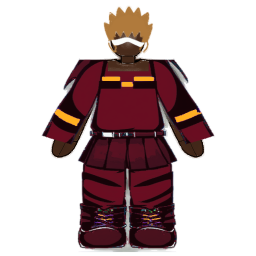
Paid: Crimson, 300 scrap

Paid: Exoframe, 600 scrap

Paid: Reticle, Frost, 650 scrap

Paid: Crest, Crimson, 550 scrap
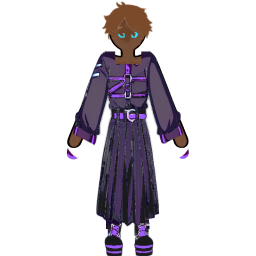
Paid: Fade, 250 scrap
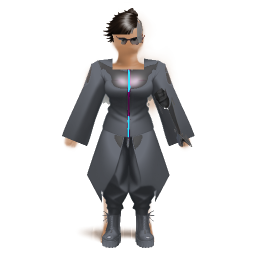
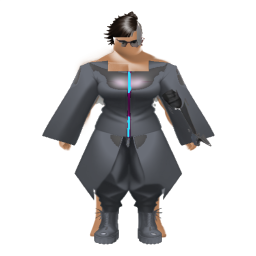
One look on each build
The same picks on all four builds: the Vest outfit, the Shades eye style and the Undercut hairstyle.
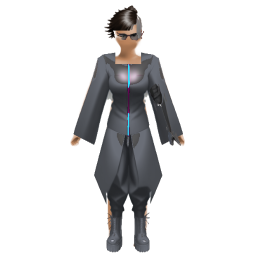
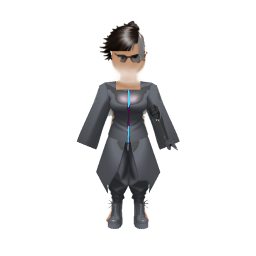
Start again
Until you save a design, the app draws a portrait generated from your lineage and class. Once one is saved, Reset to generated appears under the save button ("Back to the portrait drawn from your origin."). It asks "Reset your avatar?" first, and Reset brings the generated portrait back.
Where your avatar appears
- The top of Home, beside your name.
- The character sheet's Origin panel.
- The Arena hub's status strip, and the fight stage, where it stands in for you in a bout you play yourself.
- The Social tab, beside the box where you write a post.
- Your public profile, where it is shown in place of an uploaded photo.
The Awakening: switching from StatBlockPro to StatBlockRPG
StatBlockPro never stops counting. Every log in StatBlockPro still earns XP, levels, proficiency and streak days; the game is only hidden. The first time you switch the game on, the Awakening shows what that built.
In the appHomeSettingsApp and displayDashboardStatBlockPro
- Open the switch
In Settings, the App and display group is already open; find Mode in it. "You can switch at any time. Everything you log counts either way, so turning the game off now and on again in six months loses nothing."
- Turn the game on
Turn on Dashboard. The first time, this opens "Wake your character" rather than switching straight over.
- Choose your Origin
Pick a lineage and a class under "Choose your origin". "Your origin adds to the levels you have already earned. It never replaces them."
- Wake it
Tap Wake the character. The button reads "Pick a lineage and a class" until both picks are made.
- Read the receipt
"Already yours" lists What you did (days trained, activities logged, workouts finished, meals logged, longest streak), What it built (experience earned, stat levels gained, skills levelled), Your origin and A welcome. From there, Open the character sheet or Build your avatar.
Stat levels gained counts the levels your training earned; the Origin's levels are listed on their own.
The one-off welcome
The Awakening also pays once for the days you trained before your character had an Origin: every day with at least one activity or workout logged (the food diary and the water card on Home do not count), up to and including the day you wake it.
| Days trained | Scrap | Items |
|---|---|---|
| 10 | 250 | 0 |
| 20 | 500 | 1 |
| 40 | 1,000 | 2 |
| 60 | 1,500 | 3 |
| 100 | 2,500 | 5 |
| 150 | 2,500 | 5 |
Character questions, answered
Can I change my lineage or class later?
No. Your Origin is picked once, at sign-up or at the Awakening, and there is no way to change it afterwards. It only sets where your stats begin, and every stat keeps growing from training, so a different start matters less every month.
Which lineage and class is the best?
None. Every lineage spends exactly 12 stat points and every class exactly 4, so every character starts with 22 levels in total. Pick the shape you like. If you want the most XP, Luminarch adds 5% and Archivist adds 6%; Warden gives a second party summon each day.
Is there a level cap in StatBlockRPG?
No. Stats and proficiencies level forever. Each level asks for a little more XP than the last: level 10 needs 1,600 XP to pass and level 100 needs 63,400.
Why did my second workout today earn less XP?
Every stat has a daily soft cap. The more raw XP a stat has already had today, the less each new log adds, and a stat can never gain more than its cap in one game day. It resets when the next game day starts at 4am.
How do I change my avatar?
Open your character sheet (tap your name or portrait on Home), tap "Customise avatar", make your picks and tap "Save avatar". Paid styles show their scrap price and open the gear shop when tapped.
Do I lose progress if I start with StatBlockPro?
No. StatBlockPro records every log in full, and the character grows in the background. When you switch StatBlockRPG on for the first time, the Awakening shows what it built, adds your Origin on top and pays a one-off welcome in scrap for the days you trained, plus items once those days reach 20.
How do I unlock techniques?
By training. Each proficiency levels from the activities that train it, and techniques unlock at proficiency 10 and 30. A new technique drops into a free slot by itself; you carry four.